A home flight simulator can start as simply as a $60 joystick and an MSFS 2024 subscription, or scale into a room-filling cockpit replica. The hardware decisions (joystick or yoke, HOTAS or stick-only, rudder pedals now or later) trip up nearly every new arrival. This guide makes the call for you.
By Colin B. · Published May 30, 2026 · Last reviewed July 18, 2026
A basic joystick and MSFS 2024 gets you airborne for $130. Add rudder pedals and you're at ~$220. A full HOTAS + pedals + software setup runs $300–400 before upgrades like head tracking or VR.
We earn commission on qualifying Amazon purchases — see our
affiliate disclosure.
Price tiers and budget totals shown above are editorial estimates;
actual Amazon prices vary.
At a glance
Our top pick in each category
The fastest path through this guide — each best-starter pick by category.
Scroll for the budget and upgrade alternatives.
Don't buy hardware and software simultaneously if you're not sure this will stick. MSFS 2024 is available on Xbox Game Pass for $15/month. Try it for a week before spending $400 on a HOTAS setup. Most people who quit do so in the first two sessions.
The HOTAS vs. yoke question doesn't need to be settled on day one. A joystick works for every genre. Start there, put in 15-20 hours, and you'll know from the flying you're actually doing whether you want fighter-style HOTAS or a civil aviation yoke.
Your PC matters as much as your peripherals. MSFS 2024 is one of the most demanding games ever made. If your GPU is more than five years old, check the system requirements before buying anything. A mid-range GPU (RTX 3060 or equivalent) runs it well at 1080p.
Your flight controller is the single most important hardware decision in sim. The three types serve different flying styles: a basic joystick handles everything from MSFS touring to beginner combat; a HOTAS (Hands On Throttle And Stick) gives you dedicated stick and throttle, ideal for jets and military aircraft; and a yoke looks and feels like real-world GA and airliner controls. If you're not sure what you want to fly, start with a joystick. You can upgrade or add a yoke later without losing your investment. All picks here are plug-and-play with MSFS 2024.
Flight Controls — what's the difference?
A few common shapes, each making a different trade.
Basic Joystick
One hand, one device. Best first buy for any genre.
Axes
3 (X/Y + twist)
Throttle
Slider on base
Best for
General aviation, touring
Best for Beginners unsure of genre, general MSFS flying
Tradeoff Twist axis for rudder is imprecise vs. real pedals
The T16000M is the community's consensus starter joystick for a reason. Its 16,000-point magnetic sensor is noticeably more precise than the potentiometers in budget sticks, it's ambidextrous (left or right hand), and it maps cleanly to every major simulator. The value-to-quality ratio here is genuinely unusual: this stick outperforms competitors at twice the price.
What we like
Ambidextrous: works left or right hand, unlike most joysticks
16,000-point resolution feels precise far above this price point
Plug-and-play with MSFS, X-Plane, and DCS out of the box
What to know
Joystick only; throttle is a separate purchase
Twist axis for rudder works but isn't a substitute for real pedals
The Extreme 3D Pro has been the go-to entry joystick for two decades and is still the right answer if you want to spend as little as possible to test whether flight sim holds your attention. Twist-grip rudder, 12 programmable buttons, USB plug-and-play, under $40. Not sophisticated, but it works.
What we like
Under $40, the lowest-risk way to try flight sim for the first time
Twist grip handles rudder input without needing separate pedals
What to know
Outdated design: hat switch and buttons feel cheap vs. newer sticks
Twist rudder is imprecise; crosswind landings will frustrate you
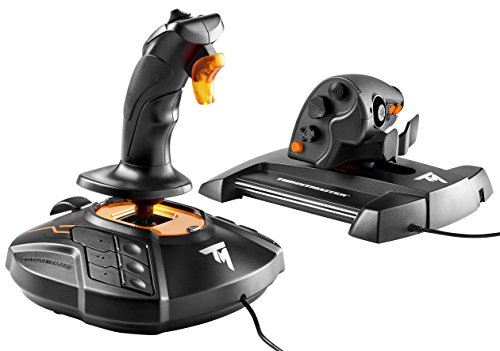
The HOTAS bundle pairs the excellent T16000M stick with the TWCS throttle, a dedicated throttle unit with 5 axes, a mini-stick, and programmable buttons. This is the setup most sim pilots end up on within three months of starting. If you already know jets and combat sims are your thing, buy this bundle once instead of upgrading piecemeal.
What we like
Stick plus throttle together, saving money vs buying parts separately
TWCS throttle has 5 axes, hat switch, and mappable buttons
Same T16000M stick; muscle memory transfers when you upgrade from solo stick
What to know
Throttle rubber coating can degrade to sticky after 2-3 years
Fighter-style throttle; less intuitive for airliner or GA flying
★★★★☆Our rating· Only 6 left in stock - order soon.
If your interest is civil aviation (Cessna 172s, Airbus A320s, Boeing 737s), the yoke is the authentic control. The Alpha is the benchmark at this price: metal construction, 180 degrees of travel, realistic resistance. It transforms MSFS into something that genuinely feels like training. Pair it with the Honeycomb Bravo throttle for a complete civil cockpit.
What we like
Metal chassis that feels like real GA hardware, not a toy
180° of travel matches real-world yoke feel better than plastic options
Pairs perfectly with the Honeycomb Bravo throttle for a full civil setup
What to know
Civil aviation only; wrong tool for jets or military aircraft
Requires separate throttle quadrant and takes up significant desk space
Rudder pedals are the second most important upgrade after your main controller. In real aircraft, your feet control the rudder, keeping the plane coordinated in turns, correcting drift in crosswind landings, and steering on the ground. You can fake this with a joystick twist axis, but it's imprecise and builds bad habits. Real pedals cost $80–300 and meaningfully improve your landing accuracy within the first session you use them. Buy them within your first month if you're serious.
Best starter
Thrustmaster
TFRP T-Flight Rudder Pedals
$129.99 as of Jun 22, 2026
★★★★★Our rating· In Stock
The TFRP is the most recommended entry-level rudder pedal in the sim community. Three axes (left/right rudder + toe brakes), smooth slide action, and it works plug-and-play with MSFS and DCS. At ~$80 it's the right first step; you won't outgrow it until you're flying seriously for a year or more.
What we like
Three axes including independent toe brakes, for full rudder control
Plug-and-play with Thrustmaster, Logitech, and Honeycomb controllers
Smooth slide action that improves noticeably after a few hours of use
What to know
No heel rest; add a book or DIY platform for long sessions
Toe brakes are stiff at first; takes a few hours to loosen up
A step up in build quality with adjustable tension and a heel rest. The Saitek design has been in production for over a decade because it works: smoother toe brakes, better floor grip, and a more comfortable seating position for long sessions. Worth the price difference if you're flying more than once a week.
What we like
Adjustable tension lets you dial in the resistance you want
Heel rest included, making sessions over an hour much more comfortable
What to know
Batch QC inconsistency; read recent reviews before buying
More expensive than TFRP with modest real-world improvement
The Charlie is Honeycomb's premium rudder pedal and the natural upgrade path for yoke users who already own the Alpha and Bravo. Hall Effect magnetic sensors eliminate drift, the aluminum construction feels genuinely substantial, and adjustable tension lets you dial in the exact resistance you want. It pairs perfectly with the Honeycomb ecosystem for a complete civil aviation cockpit.
What we like
Hall Effect sensors with no center drift or wear over time
Aluminum construction matches the Alpha yoke's premium feel
Adjustable tension knob lets you fine-tune resistance
What to know
Civil aviation oriented; designed to pair with the Honeycomb ecosystem
Higher price than comparable Logitech or Thrustmaster options
If you fly civil aircraft (GA singles, twins, airliners), a throttle quadrant gives you dedicated throttle, prop pitch, and mixture levers. HOTAS users already have a throttle built in; this category is for yoke users and joystick pilots who want physical lever control. Two clear tiers: a basic 3-lever quadrant for ~$70 (right for Cessnas and light aircraft) or the Honeycomb Bravo with full airliner switch panels for ~$250. Skip this category entirely on day one if you're buying a HOTAS.
Best starter
Logitech
G Saitek Pro Flight Throttle Quadrant
$$
★★★★★Our rating
Three assignable levers you can configure as throttle, prop pitch, mixture, or flaps, gear, carb heat for something different. Clamps to your desk, mounts alongside most yokes, and at ~$70 it's the right first throttle before you know whether you'll stay in civil aviation. Expandable: you can daisy-chain two units for a twin-engine layout.
What we like
Three fully assignable levers that configure for any GA or airliner setup
Daisy-chainable; add a second unit for twin-engine aircraft
Desk clamp included; works with any desk or sim table
What to know
Levers loosen over time; a dot of silicone grease fixes this
Plastic build quality shows the $70 price point clearly
★★★★☆Our rating· Only 5 left in stock - order soon.
The Bravo is the throttle for serious civil aviation sim pilots. Six detachable lever handles (GA to airliner), backlit annunciator panel with landing gear, flaps, autopilot, and engine switches, all functional. Pairs perfectly with the Honeycomb Alpha yoke for a complete civil cockpit that looks and operates like real hardware.
What we like
Six detachable handles cover GA, twin, and airliner layouts
Backlit annunciator with working gear, flaps, and autopilot switches
What to know
LED binding in MSFS takes patience to configure correctly
Overkill (and expensive) if you fly joystick or HOTAS
The sim you choose shapes everything. Microsoft Flight Simulator 2024 is the right starting point for most people: satellite-derived world scenery, a built-in Flight Academy, and the most beginner-friendly on-ramp in the genre. X-Plane 12 uses a physics model closer to certified flight training software and has a devoted community of real-world pilots. For military jet simulation, DCS World is the gold standard, but it's distributed through Steam and the DCS site rather than Amazon, and is best saved until after 20+ hours in a civil sim.
Best starter
Microsoft
Flight Simulator 2024
$69.99 as of Jun 22, 2026
★★★★★Our rating
MSFS 2024 is the most accessible flight sim ever made. The world scenery is extraordinary, the Flight Academy teaches real aviation concepts step by step, and the Marketplace has every add-on you'll ever want. Available as a standalone purchase or included with Xbox Game Pass. If you're not sure which sim to start with, this is the one.
What we like
Satellite-derived world scenery covering every major airport on earth
Built-in Flight Academy teaches real aviation procedures step by step
Available on Xbox Game Pass; try before buying the full $70 license
What to know
Steep system requirements; an aging GPU will struggle at high settings
Marketplace add-ons are expensive and easy to overbuy early
X-Plane 12 uses blade-element theory for its flight model, the same physics approach as software used in real aviation training. The world scenery isn't as spectacular as MSFS, but the flight feel is more accurate and the platform has a deep add-on ecosystem. A free demo covers a limited area with no time limit. Good choice if real-world accuracy matters more to you than visuals.
What we like
Blade-element flight model, closer to certified flight training accuracy
Free demo with no time limit; try before paying full price
What to know
World scenery less spectacular than MSFS 2024 out of the box
Best features emerge with add-ons, which takes time to discover
Looking around the cockpit naturally, without clicking a hat switch. It completely transforms sim immersion. Head tracking translates your real head movements into in-sim camera movement. Solutions range from free (OpenTrack software with a spare webcam) to a dedicated sensor bar (TrackIR 5 at ~$200) to full VR. Most pilots rate head tracking as the single highest-return upgrade after their main controller, because it shifts the experience from 'game with a joystick' to 'cockpit you're sitting inside.'
Best starter
NaturalPoint
TrackIR 5
$148.75 as of Jun 22, 2026
★★★★★Our rating· In Stock
TrackIR 5 is the industry standard for head tracking in flight and racing sims. Clip the reflective hat clip to your headset or cap, plug in the sensor bar, and you're tracking within minutes. Six degrees of freedom, no latency you'll notice, and compatible with hundreds of sim titles. The $200 price is real money, but pilots who buy it say it's the upgrade they wish they'd made first.
What we like
Industry standard since 2003, compatible with nearly every sim title
Six degrees of freedom; head tilt and lean translate naturally
Setup takes under 10 minutes from unboxing to in-sim tracking
What to know
Requires a reflective clip on your head (looks a bit silly in person)
$200 price stings; OpenTrack + webcam does 80% of the job for free
Full VR in MSFS 2024 and DCS World is extraordinary: you're physically inside the cockpit, reaching for switches at their actual depth, looking over your shoulder at a wing. The Quest 3 is the best standalone VR headset for the money and runs MSFS via PC Link without a dedicated VR-ready cable. This is the eventual endgame upgrade for pilots who want total immersion.
What we like
Full cockpit immersion: physically inside the aircraft, not watching it
Standalone headset runs MSFS via PC Link without a dedicated cable
What to know
Demands an RTX 4070 or better for smooth MSFS VR performance
VR frame-rate drops cause nausea; don't skimp on GPU before buying
Most new sim pilots crash the Cessna twice, get intimidated by the cockpit, and wonder what they're missing. Here's what actually happens — hour by hour — from first takeoff to your first real cross-country flight.
Flight simulation has a reputation for being intimidating. The cockpits look like alien dashboards, the manuals run to hundreds of pages, and YouTube tutorials assume you already know half of what you’re trying to learn. Most beginners bounce off within a week.
That’s almost always because they started in the wrong place — too much study, too little flying. The actual path through the first 20 hours is simpler than it looks.
Hours 1–3: Just get it in the air
Your first session has exactly one goal: take off, fly around for 30 minutes, and land. That’s it.
In MSFS 2024, open the World Map, pick a small regional airport with a short runway (KOAK, KSBA, or any Class D airport near a coast or valley), select the Cessna 172 Skyhawk, and set weather to clear skies. Disable the AI copilot assistance if you want full control, or leave it on — both are fine on day one.
Don’t read the manual first. You’ll absorb procedures much faster once you have physical feedback from the controls. Taxi to the runway, push the throttle forward, rotate around 65 knots, climb to 3,000 feet, and turn left. That’s enough of an intro.
The Cessna 172 is deliberately forgiving. It doesn’t want to stall or spin. If something goes wrong and you freeze, pulling power back and pushing forward slightly will put you in a stable glide. Let the sim surprise you.
Throttle controls climb and descent — power up climbs, power back descends. The yoke or joystick controls pitch attitude, not speed.
Rudder keeps you coordinated — when you bank, apply a little rudder in the same direction. Your feet know what to do instinctively after a few sessions.
The altimeter, airspeed indicator, and attitude indicator are the three instruments you actually need for visual flying. Everything else can wait.
By hour three, you’ll have crashed at least once on landing. That’s fine. The pattern every beginner lands long on (comes in too fast, balloons over the runway, runs off the end) is a rite of passage. Lower flaps sooner, cut power earlier.
Hours 4–10: Learning to actually navigate
The jump from “flying around” to “going somewhere” is where flight sim stops feeling like a novelty and starts feeling like a skill.
This is the phase for learning basic VFR (Visual Flight Rules) navigation: how to read a sectional chart, how to plan a route from one airport to another, and how to communicate with ATC — or at least follow the instructions MSFS’s AI ATC gives you.
Pick two airports about 60 nautical miles apart. Plot the route on SkyVector before you fly it — it shows terrain, airspace, and navigation aids. Then fly it in MSFS with the map visible on a second screen or tablet.
Flying without looking at the altimeter every 10 seconds. This happens around hour 5-6. The aircraft starts to feel stable and you stop white-knuckling the joystick.
Making radio calls to MSFS ATC. The menu-driven system is clunky, but the habit of reporting your position and intentions becomes automatic.
Your first real crosswind landing. Crosswind landings are where the gap between twist-axis rudder and real pedals becomes obvious. If you bought pedals, this is when you’ll be glad.
Don’t try to fly with real charts and full procedures yet. The goal in this phase is hours in the seat, not procedural perfection.
Hours 11–16: Weather, instruments, and things going wrong
Once you can navigate in clear weather, start adding adversity.
MSFS 2024’s weather system is genuinely impressive. Dial in overcast skies, reduce visibility, add wind. Suddenly your reliable cross-country becomes a navigation challenge — and you understand why pilots learn instrument flying.
This is also where MSFS’s Flight Academy pays off. If you haven’t worked through the instrument flying modules, hours 11-16 are when to do it. You don’t need to master IFR (Instrument Flight Rules) to benefit — understanding the ILS (instrument landing system) approach alone will transform your landing accuracy in marginal weather.
You’ll get lost once. The fix is simple (tune a nearby VOR, identify your position) but the experience of being disoriented over featureless terrain is clarifying. Respect your instruments.
You’ll try autopilot and realize it’s complicated. The autopilot in even a basic Cessna has modes — heading, altitude, nav. Spend 20 minutes with it on the ground before using it in flight.
You might start researching hardware upgrades. Head tracking becomes very appealing when you’re flying IFR approaches and want to glance at your instruments naturally. If you haven’t bought rudder pedals yet, this is when the arguments for them become unavoidable.
Hours 17–20: Your first real flight
At hour 17 or so, try to replicate a real-world flight. Pick a route you’ve actually flown as a passenger — Seattle to Portland, JFK to BOS, or wherever — and fly it in MSFS.
Use real-world charts from SkyVector. File a flight plan with MSFS’s ATC using real procedures (even if you don’t execute them perfectly). Look out the window at familiar terrain.
This is when the sim stops being abstract. You’re not flying “a Cessna” — you’re flying over specific mountains at a specific altitude with specific weather, and the decisions feel real. The $60 joystick is doing something that feels significant.
At hour 20, you’ve logged more pattern work than many real student pilots need for their first solo. You understand why certain procedures exist. You’ve had at least one moment where something went wrong and you figured it out without panicking.
What to do at hour 21
A few things change the slope from here:
VATSIM becomes accessible. You know enough radio procedure to contact ground at a small airport, get taxi instructions, and depart without embarrassing yourself. Start at a small, uncontrolled field and work up.
Study a real aircraft manual. Pick one plane — the Cessna 172 Skyhawk Information Manual is free to read online — and learn how the systems actually work. The sim models them, and knowing what’s really happening makes everything click.
Consider an aircraft add-on. MSFS’s default Cessna 172 is good. The payware Carenado or Blackbird versions model systems the default omits. After 20 hours, you’ll appreciate the difference.
You’re not a beginner anymore. You’re a sim pilot who knows the difference between flying and studying flying — and has chosen the former.
Save your money
What you don't need yet
Beginners get pressured to buy a lot of stuff that doesn't help them play
better. Here's what we'd skip on day one.
A dedicated VR headset on day one — VR in MSFS is incredible but requires serious GPU horsepower. Get your ground legs first. Learn to fly in 2D, then add VR once you're committed.
Premium aircraft add-ons — MSFS 2024 includes dozens of aircraft. The $50-100 payware planes are genuinely good, but you won't appreciate the depth until you've logged serious time in the default fleet.
A force feedback joystick — Modern FFB sticks cost $200-600 and add haptic realism. Fun when you have the budget, but the flight model feedback is easy to live without for the first year.
Triple monitor setup — Wide-field peripheral vision is useful for formation flying and approaches. A single 27-32" monitor is plenty to start, and still a significant desk commitment.
VATSIM (online ATC network) on day one — VATSIM pairs you with real human air traffic controllers. Thrilling once you know the procedures, overwhelming before you do. Log 20+ hours of solo flying first.
First week
Your first seven days
A short, real plan to get from gear-on-doorstep to actually playing.
Download MSFS 2024 or try it on Xbox Game Pass to test your system before buying hardware. · Action
Complete the MSFS Flight Academy. It's not filler: it teaches real aviation concepts in a structured way and unlocks aircraft you'll want to fly. · Action
Start every flight in the Cessna 172 Skyhawk. It's forgiving, slow, and the most realistic aircraft in the default fleet. Resist the temptation to jump straight to jets. · Action
Order a joystick so it arrives before the weekend. · Buy
Learn the six basic flight instruments (the 'six-pack'). Understanding what you're looking at transforms the cockpit from intimidating to readable. · Learn
Joystick, yoke, or HOTAS: which should I buy first?
A joystick. It works for every genre (civil aviation in MSFS, jets, combat in DCS) and costs $40-60. After 15-20 hours, you'll know whether you're drawn to civil aviation (yoke) or military jets (HOTAS). Don't buy a yoke or HOTAS until you know which style of flying actually holds your attention.
Do I need a powerful gaming PC for MSFS 2024?
More than for most games, yes. An RTX 3060 and modern CPU runs it well at 1080p high settings. An RTX 2060 is playable at medium. Anything older and you'll fight the sim more than you'll fly. Run the MSFS hardware benchmark (free tool from Microsoft) before spending money on peripherals.
What's the difference between MSFS, X-Plane, and DCS?
MSFS 2024 is for general aviation: visual, accessible, and covering the whole world. X-Plane 12 uses a more accurate physics model (closer to certified training software) and has a strong professional following. DCS is for military jet simulation: extraordinarily detailed, with aircraft study-level fidelity. Start with MSFS unless you specifically know you want combat jets.
Do I really need rudder pedals, or is the joystick twist axis fine?
The twist axis is a crutch that teaches bad habits and makes crosswind landings much harder than they need to be. Rudder pedals cost $80 and transform your landing accuracy within the first session. Buy them in your first month. They're a more impactful upgrade than almost any controller or software add-on.
Is VATSIM (online ATC) something beginners should do?
Not at first. VATSIM connects you with real human controllers who expect radio-procedure competency. It's thrilling when you're ready, but 'ready' means you know basic radio calls, can navigate to your destination, and have practiced arrivals and departures. Get 20+ hours of solo flying in first.
r/flightsim — The most active flight sim community online. Hardware questions, settings help, and route sharing. Start here before buying anything.
MSFS Official Forums — Microsoft's official community. Bug reports, community events, and the best source for MSFS-specific troubleshooting.
AVSIM — Long-running flight sim community with deep archives. Best for finding specific hardware reviews, add-on recommendations, and technical guides.
VATSIM — Online network where real human controllers staff virtual ATC. Remarkable experience once you're ready. Join after 20+ hours of solo flying.
Threshold (YouTube/Web) — High-quality editorial site for sim aviation. Add-on reviews, interviews, and flight sim news without the forum noise.
DCS World Official — Eagle Dynamics' official site for DCS World. The starting point for combat sim add-ons, free trial aircraft, and documentation.
As an Amazon Associate, JustBeginning earns from qualifying purchases.
We may also earn commission from other affiliate programs linked on this
page. Editorial recommendations are independent; we don't choose
products based on commission rates.
Product prices and availability are accurate as of the date and time
indicated and are subject to change. Any price and availability
information shown on Amazon at the time of purchase will apply.


 Best starter