A real pinball machine in your house changes how rooms work. Friends who've never given it a second thought suddenly want to play. Here's how to buy your first one right: not overpaying, not inheriting a broken restoration project, and with a plan for keeping it running.
By Colin B. · Published June 17, 2026 · Last reviewed June 17, 2026
A clean electromechanical game runs $800-2000 used. Clean solid-state Williams or Bally from the early '90s: $1500-3500. Add $150-300 for shop-out supplies.
We earn commission on qualifying Amazon purchases — see our
affiliate disclosure.
Price tiers and budget totals shown above are editorial estimates;
actual Amazon prices vary.
At a glance
Our top pick in each category
The fastest path through this guide — each best-starter pick by category.
Scroll for the budget and upgrade alternatives.
Buy a machine in a theme you actually love. You will look at it for years. A clean game in a theme you don't care about will become furniture. Browse the Pinside Top 100, play some ROMs on your phone, and make the choice on theme first.
The cheapest machines are the most expensive. A $400 project game sounds like a deal until you're six months in with $800 in parts and still no playable machine. For your first buy, pay more for something already working that just needs a standard shop-out.
Join Pinside.com before you buy anything. Search the machine you're considering in the forums. You'll learn about common failure points, scarce parts, and whether the theme holds up after a thousand plays. Takes 20 minutes and saves hundreds of dollars.
The gear
What you actually need
Machines
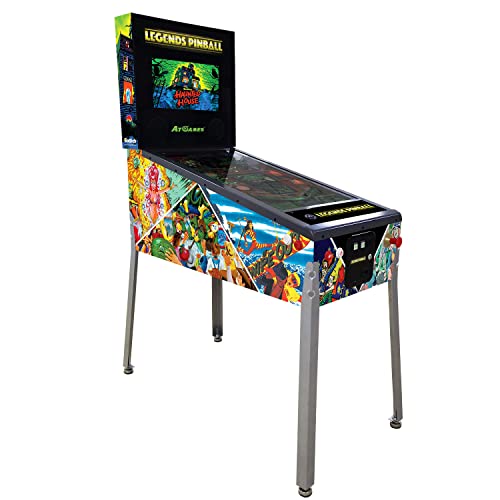
Real machines aren't sold on Amazon; they're found on Pinside Marketplace, eBay, and local classifieds. But if you want to test the hobby before committing $1500-3500 to a used machine, Arcade1UP's digital cabinets are a legitimate bridge. They run real Williams and Bally ROMs in purpose-built cabinets. Digital is not mechanical, but it answers the right question: do you love playing pinball enough to maintain one?
Machines — what's the difference?
A few common shapes, each making a different trade.
Digital Cabinet
Affordable simulation. Best for testing whether you love pinball before committing.
New price
$400-700
Maintenance
None
Physical feel
Digital simulation, real controls
Best for First-timers not yet ready to spend $2000+ on a real machine
Tradeoff Not real mechanical pinball; no solenoids, rubber, or repair skills
All-mechanical relay logic. Cheapest real machines; steepest maintenance curve.
Used price
$800-2000
Era
1969-1977
Maintenance
High (relay and solenoid focused)
Best for Collectors drawn to mechanical systems and vintage aesthetics
Tradeoff Relay logic is harder to diagnose than circuit boards; parts can be scarce
Solid-State (1977-1999)
Circuit board logic. Widest variety, best value, the collector sweet spot.
Used price
$1500-4000
Era
1977-1999
Maintenance
Medium (cap kits and switches)
Best for Most first-time buyers; best mix of value, repairability, and theme variety
Tradeoff 30-40-year-old boards often need a capacitor refresh kit
Modern Stern / Jersey Jack
New-production machines. Full warranty, LCD displays, current software.
New price
$6000-9500
Warranty
1 year parts and labor
Software
Over-the-air updates via Insider Connected
Best for Collectors who want dealer support and the latest software features
Tradeoff $6000+ price point; buy a used classic first unless budget allows both
Best starter
Arcade1UP
Williams Bally Pinball Machine
$$$
★★★★★Our rating
Arcade1UP's Williams Bally cabinet runs ten licensed titles including Attack from Mars, Medieval Madness, Fish Tales, and White Water. At around $600, it's a fraction of the cost of a real machine with zero maintenance. If you're not sure you'll love owning pinball before spending $2000, this is the right way to find out.
What we like
Licensed Williams ROM with real rules, real shots, real scoring
Zero maintenance vs. the ongoing upkeep of a real machine
Full-size cabinet with authentic Williams artwork and controls
What to know
Digital only; builds no shop-out or board repair skills
Resale value drops quickly; real machines appreciate over time
Twenty-two licensed classic and original pinball tables in one full-size cabinet. AtGames covers a broader range of titles than single-machine cabinets, at around $400. If you want to sample the widest range of tables before committing to a real machine, this is the way to do it.
What we like
Ten Williams and Bally classics in one unit
Compact size works in apartments and smaller game rooms
Around $400 for the widest golden-era pinball coverage
What to know
Compact form factor uses a slightly different playfield angle
Simulation only; no solenoid feedback of real flippers
Every used machine needs a shop-out when you bring it home: replace all rubber rings, posts, and flipper rubbers; clean the playfield; check every bulb. A complete game-specific rubber kit covers hundreds of Williams, Bally, and Stern titles and runs $25-60. New rubber makes the ball bounce true again and is the most impactful single maintenance task you'll do on a used machine.
Best starter
Game Room Guys
105-Piece Pinball Rubber Ring Kit
$80.99 as of Jun 22, 2026
★★★★★Our rating· Only 4 left in stock - order soon.
105 assorted black rubber rings covering the standard sizes used in most Williams, Bally, and Gottlieb machines from the 1980s and '90s. One kit handles a complete shop-out for most games. Cross-reference the bag against your service manual to confirm all your game's ring sizes are covered.
What we like
Game-specific kits match every rubber part for your exact machine
Pre-sorted by location makes installation systematic and clear
New rubber is the highest-impact shop-out step; old rubber hardens
What to know
Must order for your specific game title, not universal
Rubber degrades again in 3-5 years; budget for repeat orders
★★★★☆Our rating· Only 10 left in stock - order soon.
Covers Williams and Bally machines from 1993 through 1998, plus Chicago Gaming, Jersey Jack, and Spooky machines. Includes every flipper wear part: plunger rod, link, return spring, EOS switch, and rubber. Restores full factory flipper power in 30-60 minutes per side.
What we like
Includes every wear part: plunger, link, spring, EOS switch, rubber
Restores factory flipper power in 30-60 minutes per side
What to know
Must order for your specific machine; Williams and Bally parts differ
EOS switch needs soldering; watch a video walkthrough before starting
Swapping original incandescent bulbs for LEDs is the most visually dramatic afternoon mod you can do. The whole machine gets brighter, more vivid, and runs cooler. Start with warm white (2700-3000K) for a period-correct look; cool white washes out vintage artwork. A standard GI conversion runs $30-80 depending on machine size and covers all the general illumination sockets.
Best starter
RetroArcade.us
T10 555 Pinball LED Bulbs (10-pack)
$
★★★★★Our rating
T10/555-compatible LED bulbs from a pinball-specialist supplier. Order 3-5 packs for a full general illumination swap on most Williams and Bally games. Plug-in replacement for original #44 and #47 incandescent sockets. Clear versions let the original lens colors show through.
What we like
Plug-in swap; fits original sockets with no wiring changes
Warm white preserves the vintage look of period playfield artwork
LEDs last 10+ years vs. 3-6 months for original incandescent bulbs
What to know
Some machines need a ghosting diode to prevent GI flicker
Cool white (too bright, too blue) looks wrong on vintage art
Frosted diffusion spreads light more evenly than clear LEDs in colored inserts. The frosted housing prevents the harsh pinpoint-hotspot look that clear LEDs can create on tight insert designs. Use these for inserts where you want even, soft illumination.
What we like
Pre-matched insert colors preserve the game's original artistic intent
Covers every socket: GI, inserts, flashers, and backbox together
What to know
Game-specific kits cost $60-120; order a sample pack first
Wrong color choice is hard to undo after a full conversion
A dirty playfield slows the ball and dulls the artwork. Ball swirl marks, rubber residue, and oxidized clearcoat all need addressing on any used machine. Novus Plastic Polish is the pinball standard for cleaning and restoring acrylic surfaces. 99% isopropyl alcohol removes grime before you polish. Super Lube silicone keeps metal guides and shooter lanes fast. All three together cost under $30.
Best starter
Novus
Plastic Polish Kit (1, 2, 3)
$15.99 as of Jun 22, 2026
★★★★★Our rating· In Stock
Three grades for everything on a pinball playfield: #1 cleans and shines, #2 removes fine scratches and ball swirl marks, #3 tackles deep scratches. Work from #3 to #1 in order. A $30 kit that makes a 30-year-old playfield look like it was cared for.
What we like
Industry standard for pinball, pool tables, and acrylic restoration
Three grades cover cleaning through deep scratch removal in one kit
Under $30 for enough polish to treat five machines
What to know
Won't restore heavily crazed or worn-through clearcoat
Apply #2 and #3 sparingly; each use removes a thin clearcoat layer
Before you polish, clean. A lint-free cloth with 99% IPA removes decades of ball grease, rubber residue, and grime that would scratch the playfield if you polished over it. Also the right cleaner for pinball circuit boards. Buy this before the machine arrives.
What we like
Removes ball grease and rubber residue without damaging artwork
Safe for playfield art, inserts, and circuit boards at 99%
What to know
Must be 99%; 70% IPA contains too much water, avoid on older playfields
Fast-evaporating; wear gloves for extended cleaning sessions
★★★★☆Our rating· Only 12 left in stock - order soon.
The standard lubricant for pinball shooter lanes, wireforms, and metal ball guides. A thin film keeps the ball fast and stops the metal-on-metal squeaking that develops in neglected machines. Called for in Williams and Bally factory service manuals.
What we like
PTFE formula gives dry, clean lubrication that doesn't attract debris
Called for in original Williams and Bally service manuals
What to know
Never on playfield or rubber; silicone degrades both permanently
Aerosol overspray; mask surrounding areas before applying
You don't need an electronics degree to maintain a pinball machine, but you need a multimeter and basic soldering tools. The multimeter diagnoses fuses in 30 seconds, checks coil resistance, verifies switch continuity, and reads power supply voltages -- the chain of diagnosis for almost every problem you'll encounter. A soldering iron handles connector repair and switch adjustments.
Best starter
Klein Tools
MM300 Digital Multimeter
$$
★★★★★Our rating
A multimeter is how you figure out why anything in a pinball machine isn't working. Klein's MM300 reads DC and AC voltage, resistance, continuity, and diode function -- all four measurements you'll use in pinball diagnostics. Reliable brand trusted by electricians, compact enough for inside-cabinet use.
What we like
Reads voltage, resistance, continuity, and diodes -- all needed for pinball
Klein brand trusted in electrical trades; accurate and well-made
Compact enough to maneuver inside a pinball cabinet
What to know
Not auto-ranging; manually select the measurement range before reading
No backlight; harder to use in dim cabinet interiors
Pinball repair means soldering connectors back onto driver boards, fixing broken switch wires, and replacing corroded pins. This kit includes the iron, solder, stand, multiple tips, and cleaning sponge. Under $25 and covers everything a beginning machine owner needs in the first year.
What we like
Kit includes iron, solder, stand, multiple tips, and cleaning sponge
Under $25; right amount to spend before you know how often you'll solder
What to know
Inconsistent tip heat; upgrade to a Hakko station for board work
Included solder is low quality; replace with 60/40 rosin-core solder
Once you're doing real board work -- replacing connector pins, resoldering driver board components -- the Hakko FX-888D pays for itself in joint quality. Fast heat recovery, accurate temperature dial, and compatibility with Hakko's full tip line. The station serious pinball technicians use.
What we like
Rapid heat recovery keeps temperature consistent through a full repair
Compatible with Hakko's full range of tip profiles
Industry standard used by professional electronics technicians
What to know
Analog dial; no precise digital temperature display on base model
$100-120; more station than you need until repairing regularly
You found your first machine, brought it home, and now the real education starts. Here's what the first 30 days of pinball ownership actually looks like.
Most first-time pinball owners make the same sequence of discoveries. Day one: the machine is amazing and you can’t believe you waited this long. Week one: something small is wrong. Week two: something bigger is wrong. Month one: you’ve fixed three things, learned more about 1980s electronics than you expected, and you’re already looking at a second machine. This is normal. This is the hobby.
Here’s what to actually do, in order, so the first month goes well.
Before the machine arrives: get your supplies ready
The biggest mistake is waiting until the machine is in your game room before ordering anything. Used pinball machines need a shop-out immediately: new rubber, a playfield clean, and a bulb audit. If your supplies aren’t there when the machine arrives, you’ll play on a machine that needs work for a week waiting for parts.
Order before delivery:
Rubber kit for your specific game title (Pinball Life, sorted by game title)
Novus Plastic Polish kit (the 3-pack with grades 1, 2, and 3)
99% isopropyl alcohol (not 70% — the water content in lower concentrations damages old artwork and inserts)
Digital multimeter (Klein MM300 or equivalent — you’ll use this the first week)
Pinball balls (a pack of four; your machine’s balls are probably worn)
While you’re waiting, join Pinside.com and find your machine’s dedicated forum thread. Every major machine has hundreds of pages of documented problems, fixes, and buyer knowledge. You’re looking for: common failure points, which components fail first, what to check on arrival, and whether there are scarce parts you should stock while they’re available.
Download the factory service manual from IPDB.org. Free, scanned from the original. You will refer to it every time something stops working.
A shop-out is the baseline maintenance pass every used machine needs. Plan for a 3-5 hour afternoon. You’ll need the service manual, your rubber kit, IPA, Novus, a flashlight, and patience.
Step 1: Open it up and look. Raise the playfield and spend 15 minutes just looking. Check for obvious damage: burned connector pins, cracked plastics, broken wireforms, signs of water damage (rust on metal parts, warped wood). These are known quantities — you’re not surprised by them later.
Step 2: Clean the playfield. Work in sections with 99% IPA on a lint-free cloth. Wipe with the grain of the playfield, not in circles. You’ll be surprised how much comes off. After the IPA pass dries, apply Novus #2 to remove ball swirl marks, then Novus #1 to polish. The difference before and after is dramatic.
Step 3: Replace all rubber. Work through the rubber kit systematically, post by post, starting from the back of the playfield and working toward the flippers. Old rubber hardens and kills ball flow. New rubber makes the machine play like it was meant to.
Step 4: Check the flippers. Flip them by hand with power off. They should return to rest with a clean snap. Soft or sticky return means worn flipper return springs or a degraded EOS switch. A flipper rebuild kit (separate from the rubber kit) handles this.
Step 5: Audit the bulbs. Play a test game with the cabinet open and note every dead bulb you see. #44 and #47 incandescent sockets are your general illumination (GI) — these are the ones you’ll swap for LEDs if you choose to upgrade.
After the shop-out, play 20 games. Note everything that doesn’t work right: stuck ball, weak flipper, dead light zone, solenoid that fires weak or not at all. You’re building your repair list.
Most pinball problems follow a short diagnostic chain:
Is there power to the component? Multimeter on DC voltage at the component’s coil or lamp socket.
Does the switch matrix register? Enter test mode (consult your service manual) and trigger the switch.
Is the fuse intact? Every fuse bank in the cabinet is labeled in the service manual. Fuses blow for reasons — find the reason before replacing.
Is the driver board sending the signal? Advanced, but documented step-by-step in the Pinside thread for your machine.
The single most useful thing you can learn in month one is how to use your machine’s built-in test mode. Every solid-state machine from the late 1980s onward has one. It lets you fire each solenoid individually, check switch registration, and run lamp tests. Before you post on Pinside asking why something doesn’t work, run it through test mode.
The most common first-month problems:
Stuck ball: Usually a missing post, a worn coil sleeve, or debris in a ball lane. Check the obvious physical causes before assuming electronics.
Weak flipper: Worn EOS switch or a glazed coil sleeve. Both are cheap, accessible fixes.
Dead GI section: A blown GI fuse or a broken GI connector. Trace the GI string back to the fuse in your manual.
Scoring display issues: On older dot-matrix games, cracked ribbon cables or failing display boards. Common on 1990s Bally/Williams games.
When you do post on Pinside, include: machine title, era, what you’ve already checked, and what your multimeter reads at the component. You’ll get answers within hours from people who’ve fixed the exact problem on your exact machine.
Month one is successful if: the machine plays a full game without stopping, the flippers feel strong, the playfield is clean, and you have a repair list of known remaining issues (not surprises).
You don’t need to fix everything in month one. A pinball machine is not a project to complete; it’s something you maintain indefinitely. The right goal is: know your machine, know what’s wrong with it, and have a plan for the next repair. That’s what a real collector looks like.
The second machine temptation will hit around week three. Resist it. Get a full month on the first one first. You’ll know more about what you actually want in a machine and you’ll negotiate better on price.
Save your money
What you don't need yet
Beginners get pressured to buy a lot of stuff that doesn't help them play
better. Here's what we'd skip on day one.
A second machine (in the first 90 days) — The acquisition impulse hits fast and hard. Commit to one machine and learn it completely before adding another. You'll be a smarter buyer the second time.
Playfield protector or Mylar sheet — Experienced collectors mostly skip these on originals. Proper cleaning and waxing is the right care routine. Mylar on a used machine often traps grime underneath.
ColorDMD color display upgrade — A $200 color display mod for dot-matrix-era machines. Genuinely nice, but not your first priority. Learn the machine's rules and sounds first; ColorDMD is a second-year project.
Reproduction backglass — Runs $200-500 and is unnecessary until you know the condition of your original. Your first task is evaluating, not replacing.
A dedicated pinball workbench — A card table and good lighting handles your first year of repairs. The dedicated workbench is for collectors maintaining three or more machines.
First week
Your first seven days
A short, real plan to get from gear-on-doorstep to actually playing.
Join Pinside.com and find your machine's dedicated discussion thread before you do anything else. · Action
Pinside.com · The main pinball community: forum, marketplace, and machine database
Download the service manual for your machine from IPDB. You'll refer to it constantly. · Learn
IPDB.org · Free scanned manuals and schematics for every commercial pinball machine
Order your rubber kit, Novus polish, IPA, and multimeter before the machine arrives. · Buy
Do your first shop-out: clean the playfield with IPA, replace all rubber, and test all flippers and bumpers. · Action
Play 20 games and write down what doesn't work: stuck ball, weak flipper, dead light zone, or intermittent GI outage. · Action
Post a photo and your findings to Pinside. The community loves first-machine posts and you'll get useful diagnosis help. · Action
FAQ
Common questions
Where do I actually buy a used pinball machine?
Pinside Marketplace is the best source: listings include Pinside reputation scores and detailed photos. eBay has wide selection but requires more due diligence on sellers. Local classifieds (Facebook Marketplace, Craigslist) let you inspect in person. Avoid 'project machines' unless you know exactly what you're taking on.
What should I expect to pay for a first machine?
Budget $800-2000 for a working electromechanical game; $1500-3500 for a clean solid-state Williams or Bally from the early '90s. A machine advertised as 'just needs a little work' almost always needs more. Pay for proven condition, not potential.
How hard is it to maintain a pinball machine?
Easier than most people expect. A standard shop-out (clean, new rubber, bulb check) is a beginner-friendly afternoon project. Electronics diagnosis is more complex but every machine has a dedicated Pinside thread with repair walkthroughs. Most problems you'll encounter are already documented.
What's the difference between an EM and a solid-state machine?
Electromechanical (EM) machines from 1969-1977 use relay logic -- all-mechanical switching with a distinctive clunking sound. Solid-state machines (1977 onward) use circuit boards for scoring and logic. Most beginners start with solid-state. The early '90s Williams era (Theatre of Magic, Medieval Madness, Addams Family) is the collector sweet spot.
Are pinball machines a good investment?
Clean examples of popular titles (Addams Family, Medieval Madness, Attack from Mars) have appreciated steadily over 20 years. But buy because you love playing, not for investment return. Condition matters enormously to resale value, and maintenance is an ongoing commitment.
What should I watch for when buying a used machine?
Look for: all flippers work, no stuck balls, original playfield art intact, seller who plays it regularly. Red flags: 'needs minor repair,' modified boards without documentation, deep ball damage under inserts. Always ask for a 15-minute gameplay video before making the trip.
Pinside — The central pinball community: forum, marketplace, and machine database. Search any machine to find its dedicated thread with buyer guides, common problems, and repair walkthroughs.
IPDB — Internet Pinball Machine Database — Free archive of service manuals, schematics, and production data for virtually every commercial pinball machine ever made. The first stop before any repair.
Pinball Resource — Original-manufacturer authorized parts for Williams, Bally, Gottlieb, and Stern. When Pinside says 'get it from PBR,' this is where.
Pinball Life — Game-specific rubber kits, LED components, and replacement parts. The most beginner-friendly parts catalog; easy to find what you need for your specific title.
r/pinball — Active community. Good for first-machine questions and condition assessments when you post photos. Less technical depth than Pinside but faster response for quick questions.
Stern Pinball — The main manufacturer of new production machines. Browse their current lineup and use the dealer locator for local authorized service.
As an Amazon Associate, JustBeginning earns from qualifying purchases.
We may also earn commission from other affiliate programs linked on this
page. Editorial recommendations are independent; we don't choose
products based on commission rates.
Product prices and availability are accurate as of the date and time
indicated and are subject to change. Any price and availability
information shown on Amazon at the time of purchase will apply.
Our top pickGame Room Guys 105-Piece Pinball Rubber Ring Kit

 Best starter