Making your own beats and tracks from a bedroom studio has never been more accessible, or more confusing. DAW, audio interface, monitors, plugins: the gear rabbit hole goes deep fast. Here's what you actually need to start making real music, and what can wait until you know what kind of producer you're becoming.
By Colin B. · Published May 24, 2026 · Last reviewed June 14, 2026
Focusrite Scarlett 2i2 4th Gen
— Two inputs, class-leading preamps, and the brand behind 90% of bedroom studios worldwide. The one to get.
Audio-Technica ATH-M50x
— Honest frequency response, studio durability, and nearly every tutorial you'll watch was mixed on these headphones.
Akai Professional MPK Mini MK3
— 25 keys and 16 velocity-sensitive pads. Most beatmakers rank this as the most-used piece of hardware in their studio.
Budget total
$200
Typical total
$600
A real starter setup (interface, headphones, and a MIDI keyboard) lands around $400-600. Add a paid DAW and you're at $700. The gear lasts years.
We earn commission on qualifying Amazon purchases — see our
affiliate disclosure.
Price tiers and budget totals shown above are editorial estimates;
actual Amazon prices vary.
At a glance
Our top pick in each category
The fastest path through this guide — each best-starter pick by category.
Scroll for the budget and upgrade alternatives.
Don't buy studio monitors first. Your room acoustics will ruin them. Start with headphones; they're more revealing for mixing in an untreated room, they travel, and they cost less. Monitors are a year-one upgrade, not a day-one necessity.
Your DAW is your instrument. Spend $100-200 on software you love before buying hardware you don't understand yet. GarageBand is free and genuinely capable; start there if you're on a Mac. Ableton Live Intro and FL Studio both have free trials; use both and pick the one that feels like fun, not the one YouTube says is professional.
The audio interface is the only piece of hardware you truly need on day one if you're recording live audio (vocals, guitar). If you're making purely digital beats with MIDI and samples, you can start with your laptop's headphone output; but an interface will clean up your monitoring immediately.
The audio interface is the hub of a recording studio; it converts your microphone and instrument signals into digital audio your computer understands, and sends studio-quality audio back to your headphones or monitors. The Focusrite Scarlett line has dominated the beginner market for a decade: the preamps punch above their price, the drivers are rock-solid, and every tutorial on YouTube assumes you have one.
Audio Interface — what's the difference?
A few common shapes, each making a different trade.
1-input (Solo)
One mic or instrument at a time. The smallest Focusrite.
Inputs
1 mic/line
Headphone outs
1
Phantom power
Yes
Best for Solo producers, voice-only recording, minimal desk space
Tradeoff Can't record two sources at once; no layering voice and guitar live
Two inputs means you can record a vocal and a guitar simultaneously, or keep a spare channel for when you inevitably trip over cables. The 4th Gen adds built-in headphone monitoring with no latency, a genuine improvement for singers tracking to a beat. Every beginner forum recommends this for a reason: it's the interface that just works.
What we like
Two inputs, so vocal and guitar can record simultaneously
Air mode adds transformer-style harmonic warmth at no extra cost
Rock-solid drivers with sub-5ms latency on every major OS
What to know
Only two inputs; not for recording drums or a full band
Plastic chassis feels less premium than the price suggests
Under $60 and legitimately usable. The MIDAS-designed preamp is better than the price has any right to suggest. If you're not sure music production will stick, this lets you try a real studio setup without committing $160 to the hobby.
What we like
MIDAS-designed preamp, punchier than anything else at this price
Under $60, the right call if you're still testing the hobby
What to know
Single input limits you to one source at a time
No phantom power on all versions; confirm specs before buying
Universal Audio made its name on hardware compressors used in the world's best studios. The Volt 276 brings that legacy to a $230 interface; it has a built-in 1176-style analog compressor that makes every vocal take sound polished without touching a plugin. Once you've got your basic setup dialed, this is a meaningful step up.
What we like
Built-in 1176-style compressor polishes vocals without a plugin
UA's legendary preamp lineage in an affordable desktop package
What to know
Compressor adds color; not ideal when you want a flat signal
At $230 it's an upgrade purchase, not a day-one starter
Studio headphones are flat; they don't boost bass or add warmth the way consumer headphones do. That honesty is the point: if your mix sounds good on flat headphones, it'll translate to car speakers and earbuds. Start with headphones before monitors. They're cheaper, they work in any room, and they block out the world while you're in the zone.
Best starter
Audio-Technica
ATH-M50x
$159.00 as of Jun 22, 2026
★★★★★Our rating· In Stock
The most-recommended studio headphones in any beginner forum, for a decade running. Closed-back design isolates you from room noise, the frequency response is honest enough to mix on, and the earcups fold for travel. Slightly bass-heavy compared to true reference monitors; once you know that, you mix around it.
What we like
Closed-back isolation keeps room noise out during tracking
Flat-ish response reveals mix problems your earbuds hide
Foldable and portable, the studio headphone that travels well
What to know
Slight low-end emphasis can trick you into cutting too much bass
Ear pads wear out after 2-3 years of daily use (easily replaced)
The radio station and broadcast standard since 1991. The frequency response is well-documented; once you know how they color sound, you can mix reliably. Often under $90 and frequently on sale. The choice when budget matters more than the last word in accuracy.
What we like
Studio standard since 1991 with massive reference data available online
Bright high end exposes harsh frequencies before they ruin a mix
What to know
Earpads crack with use; budget $15 for a replacement set
Made in Germany, built to survive daily professional use. Closed-back with excellent isolation; perfect when you're recording vocals and can't have headphone bleed into the microphone. The bass response is more extended than the M50x, which some producers prefer for trap and low-end-heavy genres.
What we like
Made in Germany, built for daily studio use with replaceable parts
Extended low end, honest bass representation for low-frequency genres
What to know
Three impedance versions create buyer confusion; get the 80 Ω
Velour pads add warmth some producers dislike for critical listening
A MIDI controller is a keyboard (or pad grid, or both) that doesn't make sound on its own; it sends musical information to your DAW, which plays whatever instrument you have loaded. You play piano notes; your software synthesizer or sample pack responds. Even if you've never touched a piano, a 25-key compact controller will change how you think about melody in the first week.
Best starter
Akai Professional
MPK Mini MK3
$99.00 as of Jun 22, 2026
★★★★★Our rating· In Stock
25 velocity-sensitive keys, 16 MPC-style drum pads, 8 knobs, and a built-in arpeggiator; all in a package that fits beside a laptop. The MK3 fixed the MK2's wobbly joystick and ships with Ableton Live Lite, MPC Beats, and sample packs worth $200. Easily the most popular compact MIDI controller on the market.
What we like
Keys + pads + knobs in one unit, the complete beginner toolkit
Bundles Ableton Live Lite and MPC Beats; saves $100+ in software
USB-powered, compact enough to use anywhere
What to know
Mini-size keys feel cramped for players with large hands
16 pads are small; not ideal if finger-drumming is your main mode
Arturia bundles more software than almost any competitor at this price; Analog Lab with 2,000+ presets, Mini V, and Pigments. The pads have better velocity sensitivity than the Akai at the same price point. If software breadth and pad feel matter more to you, this is your pick.
What we like
Bundled software (Pigments, Analog Lab) worth more than the hardware
Pad velocity curve feels more natural than many sub-$100 controllers
What to know
Flat, slim keys; adequate for inputting parts, not piano skill-building
No built-in arpeggiator; Akai's edge for live performance
49 full-size keys is the jump from input device to real keyboard; two-handed parts, more than two octaves at once, and room to practice actual piano technique. Deep Ableton Live integration auto-maps every control instantly. Buy this when the 25-key mini feels like it's holding you back.
What we like
49 full-size keys for two-handed playing and actual piano exercises
Native Ableton Live integration maps every control automatically
What to know
Too large to fit in a bag; a desktop-only purchase
Overkill until you've genuinely outgrown a 25-key controller
Your DAW (Digital Audio Workstation) is where everything happens; recording, arranging, mixing, mastering. It's the most important tool in your setup and the most personal choice you'll make. Don't pick based on what professionals use; pick based on what makes you want to sit down and make music. Ableton Live is the standard for electronic and beat-making. FL Studio is beloved for hip-hop, with the best piano roll interface in the business. Both have free trials.
Best starter
Ableton
Live 12 Intro
$99.00 as of Jun 22, 2026
★★★★★Our rating· Only 3 left in stock - order soon.
Live's session view (a grid of clips you trigger like a DJ) is unlike anything else in music software, and most beginners love it within a week. Intro limits you to 16 tracks and 6 instruments, which is plenty to learn on. The massive community (YouTube, subreddits, free patches) means help is everywhere.
What we like
Session view workflow is uniquely suited to beat-making and improvising
Enormous tutorial library online; any technique, any skill level
What to know
Intro caps at 16 tracks and 6 instruments; you'll feel it within a year
Perpetual license costs more upfront than FL Studio's entry level
FL's piano roll is the best in the DAW world; programming beats and melodies feels visual and intuitive in a way Ableton doesn't. The Fruity Edition is the entry-level tier, which gives you full access to the step sequencer, piano roll, and FL's core workflow. Image-Line's killer policy: lifetime free updates. Buy Fruity, pay the upgrade later, own every future version.
What we like
Lifetime free updates; pay the Fruity price, get every future version
The best piano roll interface of any DAW; beats and melodies click
What to know
Fruity Edition lacks live audio recording directly into the playlist
Historically Windows-first; Mac version works but some plugins lag
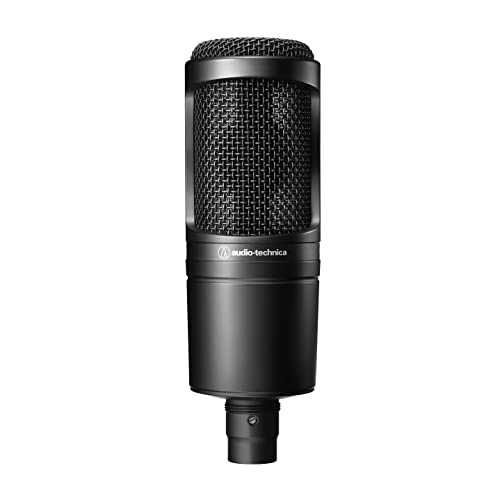
Most producers come for the beats and stay for the vocals; eventually. A large-diaphragm condenser microphone through your audio interface will capture vocals and acoustic instruments with a clarity your laptop mic will never match. You don't need this on day one, but when you're ready to record your first take, skip the USB mics and go straight to an XLR condenser through your Scarlett.
Best starter
Audio-Technica
AT2020
$119.00 as of Jun 22, 2026
★★★★★Our rating· In Stock
The most-used beginner condenser mic on the internet, for good reason. Flat frequency response, cardioid pattern to reject room noise, and a natural presence peak that helps vocals sit in a mix. Requires your interface's phantom power (+48V). At $99 it's the right starting point for any vocal genre.
What we like
Flat cardioid response rejects room noise and bleed reliably
Presence peak around 10kHz helps vocals cut through a mix naturally
What to know
Needs a stand and pop filter; add $25 to the budget
Condenser mics pick up room noise; record in the quietest spot you have
Under $35 and USB; no audio interface required. The quality won't compete with an AT2020 through a proper interface, but it's a legitimate way to record rough ideas and test whether vocals belong in your workflow before you invest in the full setup.
What we like
Under $35 and plug-and-play; no interface or drivers needed
Good enough to demo ideas and test whether vocals fit your workflow
What to know
Bypasses your interface; latency and preamp quality noticeably worse
The SM7B with a built-in preamp. The original SM7B (used on Thriller, countless hip-hop albums, every podcast) needs so much gain that budget interfaces can't drive it cleanly. The SM7dB adds 20dB onboard; so it runs quietly through any interface. When you're ready to sound like a professional, this is the mic.
What we like
Built-in preamp solves the SM7B's gain problem on budget interfaces
Dynamic capsule rejects room noise; no acoustic treatment needed
What to know
Premium price ($400); a serious investment for bedroom producers
Darker, flatter sound than a condenser; not every vocal aesthetic
Studio monitors are designed to reproduce audio without flattering it. Your consumer speakers and Bluetooth headphones are tuned to sound exciting; monitors are tuned to sound accurate. That accuracy lets you hear problems in your mix before they follow you into every other listening environment. Most bedroom producers should wait 6-12 months before buying monitors; your untreated room adds bass reflections that will fool you. Headphones first.
Best starter
Yamaha
HS5
$199.99 as of Jun 22, 2026
★★★★★Our rating· In Stock
The white-woofer Yamahas are famous for being honest to the point of ruthlessness; they won't flatter a bad mix, which is exactly what you need. The HS5 is appropriate for small rooms. Yamaha's NS-10 studio monitors were the professional standard for three decades; the HS line is their direct successor. Sold as single units; buy two.
What we like
Ruthlessly honest response; exposes mix problems before you export
Industry lineage directly from Yamaha's legendary NS-10 monitors
What to know
Sold individually. Buy two and double the listed price
A revealing monitor punishes untreated rooms; add bass traps first
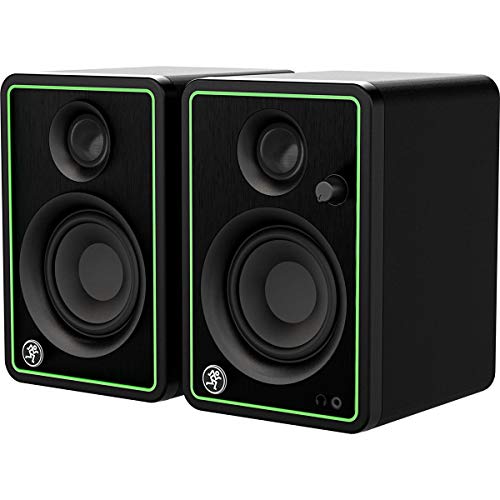
Under $100 for a pair, and Mackie's decades of PA and studio experience shows. Not as flat as the Yamahas, but more honest than consumer computer speakers and a smart way to get comfortable with speaker-based mixing before investing in something serious.
What we like
Sold as a pair, the full stereo setup under $100
More honest than consumer computer speakers for mix decisions
Most beginners buy gear before they understand what they're trying to make. Here's what actually happens in your first month, and how to skip the detours that trap everyone.
Music production has a peculiar learning curve. The first hour feels magical: you loaded a drum sample, you triggered a synth, something rhythmically interesting happened and you made it. Then the second hour arrives and you open YouTube to figure out what that thing you just made actually is, and three hours later you’re watching a video about sidechain compression and you haven’t touched the keyboard.
This is the trap. Here’s how to avoid it.
Week 1: Make something bad on purpose
Your goal in the first week is not to make a good track. Your goal is to make a finished track, defined as: has a beginning, a middle, and an end, is at least 90 seconds long, and you exported it as an audio file.
Don’t worry about genre, don’t worry about mixing, don’t worry about whether it sounds like what you hear on Spotify. Just build something with the tools in front of you and drag it across the finish line.
Download Ableton Live or FL Studio’s free trial before buying anything. Both give you full access to the software for long enough to know which one you like. In Ableton: drag a drum loop into a clip slot and hit play. In FL Studio: open the step sequencer and tap a kick-snare pattern with your mouse. Either way, you’re making music in the first five minutes.
If you have a MIDI keyboard in front of you, plug it in. Play a root note of any chord on every downbeat of your drum loop. That’s a bassline. You are producing.
The instinct to learn more before making more is a lie your brain tells you to avoid the discomfort of creating something rough. Override it. Make the rough thing. Save it. Export it. Move on.
After your first finished (bad) track, pick exactly one thing you don’t understand and learn it. Not five things. One.
Good single-week topics for beginners:
The arrangement. What happens at 30 seconds, 60 seconds, 90 seconds? Where do elements drop out, where do they come back in? This is structure, and it’s the difference between a loop and a song.
EQ basics. Every instrument occupies a range of frequencies. Low-pass filter the high end off your kick. High-pass filter the low end off your lead synth. Listen to what changed.
Velocity. Every MIDI note you draw in has a velocity value (how hard it was “hit”). Drums that all have the same velocity sound robotic. Drop alternate hi-hats to 60% velocity. Listen to what changed.
One concept per week. That’s a sustainable learning pace. Trying to absorb five techniques simultaneously means absorbing none of them.
The YouTube rabbit hole is real. Budget one 15-minute tutorial per session. Watch it once, implement what you learned, then close the browser. If you watch more than two tutorials without making anything, you’re studying instead of producing. Put the ratio in your favor.
Week 3: Finish another track (slightly less bad)
By week three, you have one finished track and two or three partial sessions that you abandoned. That’s normal. This week, finish another one.
The second finished track is where the real learning is. You’ll run into a problem you didn’t have last time: something sounds wrong in a way you can hear but can’t name. That specific friction is where you should spend your learning energy.
The most common week-three sticking points:
Your mix is muddy. Everything is fighting for the same frequency range. Solution: high-pass filter everything except your kick and bass, and watch the mud clear.
Your arrangement goes nowhere. It’s a 30-second loop that repeats for three minutes. Solution: cut the loop in half, then double it by adding one element at a time and subtracting one element at a time. Movement is the arrangement.
You can’t transition between sections. Your verse and chorus don’t connect cleanly. Solution: put a one-bar fill (a drum break, a filter sweep, a pitched snare roll) at the transition point.
None of these require you to know music theory. None require expensive plugins. They require you to listen, identify the problem, and fix one thing.
Week 4: Get critical and get honest
At the end of week four, you have two finished tracks. Play them for someone else: a friend, a family member, anyone who will give you a real reaction. Watch their face, not your phone.
You will notice things you didn’t notice before. The mix that sounded fine on your headphones sounds wrong on their Bluetooth speaker. The drop that felt massive in your bedroom barely registers through laptop speakers. The intro is 45 seconds of buildup and they checked out at 20.
This is useful information. Don’t defend the tracks. Write down what you hear.
Then join r/WeAreTheMusicMakers and post one of them in the weekly feedback thread. Describe it as “first month of production, brutal honesty welcome.” You will receive both useful feedback and wrong feedback. The skill is learning to tell them apart.
The producers who improve fastest are the ones who finish tracks, share them before they’re ready, and use the discomfort of early feedback to learn what to fix next. The producers who stay stuck are the ones who spend six months on a single track trying to perfect it before anyone hears it.
The things that actually matter in month one
Finish tracks. Not loops; tracks with arrangements, beginnings, and ends. Finishing is a separate skill from producing, and it takes practice. Two finished bad tracks teach you more than one unfinished good one.
Don’t buy more gear. Your Akai MPK Mini and your headphones and your DAW are enough to make anything you can imagine in the first year. Every gear purchase beyond those is procrastination wearing a receipt.
Learn your DAW, not all DAWs. The “is Ableton or FL Studio better?” debate has no answer. Learn one deeply. Switch only if you’ve genuinely hit a ceiling (it won’t happen in the first year).
Trust your ears before the meters. Loudness meters, spectrographs, and frequency analyzers are tools. They tell you things. But if it sounds right to you and the meter says it’s wrong, listen more and adjust. Don’t just trust the meter. Mixing by ear is a skill. It develops slower than mixing by meters. That’s fine.
Listen to reference tracks. Find three songs in your genre that you think are mixed well and open them in your DAW next to your project. A/B between them and your track. This is how professional engineers calibrate their ears, not by reading.
What comes after month one
After you’ve finished a handful of tracks and identified the specific things that are holding them back, a few investments start making sense:
Upgrade your DAW. If you’re on Ableton Live Intro and hitting the 16-track limit, Live Standard is the move. If you’re on FL and pattern-arranging feels like a workaround, spend time with the playlist view before switching DAWs.
Get an XLR microphone. If any of your tracks have vocal ideas you’re recording on a phone or laptop mic, the Audio-Technica AT2020 through your Scarlett will cost $100 and sound 10x better.
Take one lesson. After 30-40 hours of production, you have enough context to know what you don’t know. A single session with a local producer or mixing engineer who’ll look at your actual project will be more useful than 20 hours of YouTube tutorials.
You’re not a beginner anymore after month one. You’re an opinionated newcomer with messy tracks and strong instincts, which is exactly where you should be.
Save your money
What you don't need yet
Beginners get pressured to buy a lot of stuff that doesn't help them play
better. Here's what we'd skip on day one.
Studio monitors for the first 6 months — Your untreated room adds bass reflections that fool you as badly as bad speakers. Headphones first, monitors later once you know what you're listening for.
Hardware synthesizers — VST plugins like Serum, Vital (free), and your DAW's stock instruments do everything a hardware synth does, without cables or desk space.
Acoustic treatment foam panels — Real treatment costs $300+ to do properly. The cheap foam sold for $30 treats high frequencies only and often makes rooms worse for mixing. Treat after 50+ hours of production time.
Expensive plugin bundles — Waves, iZotope, and Fabfilter are excellent. They're also unnecessary for the first year. Stock DAW plugins are underrated and capable of professional results.
A hardware compressor or outboard preamp — Outboard hardware is a vibe, not a need. Software versions are indistinguishable at the bedroom level.
A mixing engineer — Hire one later, once you're happy with your arrangements. Sending half-finished tracks for professional mixing is an expensive way to learn you needed to record differently.
First week
Your first seven days
A short, real plan to get from gear-on-doorstep to actually playing.
Download a free DAW and spend an hour making noise with it before buying anything. · Action
Finish one short track; 2 minutes minimum. Bad is fine. Finished is the point. · Action
FAQ
Common questions
Do I need an audio interface if I'm just making beats?
Not strictly. If you're making purely digital music; programming drum patterns, using VST instruments, working entirely in your DAW; you can start with your laptop's built-in output. An interface improves audio quality and monitoring latency, but it's not blocking you on day one. You do need one the moment you want to plug in a microphone or a guitar.
What's the best DAW for beginners?
Whichever one makes you want to sit down and make music. Ableton Live is the electronic and beat-making standard, with a session-view workflow unlike anything else. FL Studio is beloved for hip-hop and has the best piano roll interface of any DAW. GarageBand (Mac, free) is legitimately capable for learning. Try all three before spending money.
Mac or Windows for music production?
Both are fine. Mac has lower audio driver latency out of the box and Logic Pro (Mac-only) is $200 for a professional-grade DAW. Windows has a wider hardware selection and FL Studio has historically been more polished on Windows. Either works; don't buy new hardware just for music production.
Do I need to know how to play piano?
No, but even one month of basics will change your relationship to melody and harmony. You don't need to read sheet music; just knowing what a major scale feels like and where common chord patterns live will make your productions better in ways that no amount of sound design knowledge will.
How much should I budget to get started?
A real starter setup; Focusrite Scarlett 2i2, ATH-M50x headphones, Akai MPK Mini, and Ableton Live Intro; costs about $500-600. That's everything you need to make and record professional-sounding music. The only additions later are a microphone ($100) and eventually monitors ($300-600 for a pair).
Should I start with headphones or studio monitors?
Headphones first. Studio monitors need an acoustically treated room to be useful for mixing. Without treatment, bass resonances will fool you just as badly as bad speakers. ATH-M50x or MDR-7506 headphones are honest enough to learn on. Upgrade to monitors after 6-12 months.
Produce Like A Pro (YouTube) — Warren Huart's channel; genre-neutral, covers everything from recording to mixing. The best all-rounder for beginners.
In The Mix (YouTube) — The best mixing tutorial channel for beginners. Ableton-heavy but the concepts transfer to any DAW.
r/WeAreTheMusicMakers — The main producer community; welcoming to beginners, opinionated on gear, good for early-track feedback.
r/edmproduction — Focused on electronic music production. More technically deep than WATMM. Great for specific genre questions.
Attack Magazine — Electronic music production tutorials, history, and producer interviews. Smart editorial voice, genuinely useful technique content.
Sound On Sound — The professional recording and production magazine. Dense but authoritative. 'Synth Secrets' and 'Mix Rescue' columns are both worth reading.
As an Amazon Associate, JustBeginning earns from qualifying purchases.
We may also earn commission from other affiliate programs linked on this
page. Editorial recommendations are independent; we don't choose
products based on commission rates.
Product prices and availability are accurate as of the date and time
indicated and are subject to change. Any price and availability
information shown on Amazon at the time of purchase will apply.


 Best starter