DJing is one of those hobbies where the first purchase defines your entire first year. Pick the right controller and you're mixing tracks within a week. Pick wrong and you're fighting software bugs, underpowered hardware, or gear you'll outgrow in three months. Here's what to buy first, and what to hold off on.
By Colin B. · Published May 24, 2026 · Last reviewed June 10, 2026
Controller, DJ headphones, and a pair of monitors. The controller is the biggest ticket, budget options exist, but the Pioneer DDJ-FLX4 at $299 is worth the extra spend.
We earn commission on qualifying Amazon purchases — see our
affiliate disclosure.
Price tiers and budget totals shown above are editorial estimates;
actual Amazon prices vary.
At a glance
Our top pick in each category
The fastest path through this guide — each best-starter pick by category.
Scroll for the budget and upgrade alternatives.
Your controller IS your mixer. Don't buy a separate DJ mixer. Modern controllers have EQ, faders, and effects built in. A standalone mixer is only relevant if you go the CDJ or vinyl route, which you shouldn't as a beginner.
Software is mostly free with the right controller. Pioneer bundles Rekordbox with every DDJ controller. Serato DJ Lite comes with many others. You don't need to pay for DJ software on day one. The paid upgrades are for features you won't use for months.
You can mix with headphones only at first. Studio monitors are nice but not day-one essential. Many DJs practice exclusively on headphones for months. If you're in an apartment and noise is a concern, you may prefer it indefinitely.
Your controller is the only gear purchase that genuinely matters at the start. A modern DJ controller plugs into your laptop via USB and bundles DJ software, you don't buy Rekordbox separately with Pioneer gear. The Pioneer DDJ lineup is the category standard for a reason: the layout mirrors every club booth in the world, so everything you learn transfers directly. Resist the urge to jump to a 4-channel controller or a CDJ setup, two channels is everything you need to master beatmatching, EQ, and phrasing. Lock in the fundamentals first.
Controllers — what's the difference?
A few common shapes, each making a different trade.
2-Channel Controller
Plug into your laptop, software included. Right for 95% of beginners.
Channels
2
Software
Rekordbox included
Price range
$99–$299
Best for Beginners learning beatmatching, home practice, bedroom DJs
Tradeoff Can't blend more than two decks simultaneously
Club-standard standalone players. No laptop needed, but $2,000+ to enter.
Channels
2–4
Software
None (standalone)
Price range
$2,000+ used
Best for DJs preparing for actual club gigs who already know the fundamentals
Tradeoff Massive cost jump; skills don't transfer as quickly as controller-to-CDJ
Best starter
Pioneer DJ
Pioneer DDJ-FLX4
$328.95 as of Jun 22, 2026
★★★★★Our rating· In Stock
The DDJ-FLX4 is the right answer for almost every new DJ. Bundled Rekordbox license means zero extra software cost. Two channels cover everything you need to learn, beatmatching, EQ, and phrasing. The layout closely mirrors club-standard CDJ/DJM setups, so skills transfer when you eventually play out. Full-size jog wheels, solid build quality, and a street price around $299.
What we like
Bundled Rekordbox license, no extra software cost on day one
Full-size jog wheels respond like club CDJ platters
Layout mirrors industry CDJ/DJM setups, skills transfer directly
What to know
No standalone mode, always needs a laptop connected via USB
Built-in sound card limits pro audio routing for advanced setups
★★★★☆Our rating· Only 7 left in stock - order soon.
If you're not ready to commit $299, the Inpulse 300 MK2 is the honest budget pick. Under $150, includes DJUCED software, and has an interactive training mode that teaches beatmatching step-by-step inside the app. Jog wheels are smaller than the Pioneer's, which matters for scratching, but for learning to mix and transition, it's completely adequate.
What we like
Under $150 with DJUCED software included, very low barrier to entry
Built-in training mode teaches beatmatching interactively in-app
Compact size stores easily in a small space
What to know
Small jog wheels feel nothing like real CDJ platters
DJUCED community is smaller than Rekordbox or Serato user bases
When you're ready to stop being a beginner, the FLX6-GT is where most serious home DJs land. Four channels, bundled licenses for both Rekordbox and Serato, and a much richer effects section. Don't buy this as your first controller, you won't use what makes it special until you have 50+ hours on a 2-channel setup.
What we like
Four channels for blending multiple tracks simultaneously
Bundled Rekordbox AND Serato licenses, choose either workflow
Richer effects bank rivals dedicated DJM club mixers
What to know
At ~$599, twice the price, overkill until you're truly committed
Size and weight make it harder to travel with than compact starters
Headphones are the one piece of gear you cannot skip. In the DJ booth, you pre-listen (cue) the next track in your ear before your audience hears it, and that cuing workflow is how every transition gets made. DJ-specific headphones have swiveling earcups so you can monitor one side while the other plays the live mix. Most audiophile headphones don't do this. You can learn on any decent closed-back headphone, but the real thing makes the workflow obvious in a way a workaround never does.
Best starter
Pioneer DJ
Pioneer HDJ-CUE1
$85.00 as of Jun 22, 2026
★★★★★Our rating· In Stock
Pioneer builds the controllers that define the industry, and the HDJ-CUE1 is their entry DJ headphone built for the mixing workflow. Swiveling earcups let you rest one cup on your ear while cueing the next track, the move every clean transition runs on. Clear highs and punchy lows help kick drums cut through even in loud rooms. A solid first DJ headphone at a fair price.
What we like
Swiveling earcups built for single-ear cuing, the DJ standard
Tuned for DJ monitoring with clear highs and punchy bass
Coiled cable option stays out of the way during a live set
What to know
Not flat enough for critical music production or mixing
No active noise cancellation, loud venues still bleed through
The cheapest way into actual closed-back monitoring. The M20x lacks the swiveling earcup that makes DJ headphones ergonomic for cueing, so you'll slide one ear off to hear the room, but at under $50, they're a legitimate option if you're not sure DJing will stick. Don't confuse them with the pricier M40x, not meaningfully better for DJ use.
What we like
Under $50 and genuinely capable for monitoring practice mixes
Folds flat for easy transport to sessions or a friend's setup
What to know
No single-ear swivel, you have to slide them off to cue
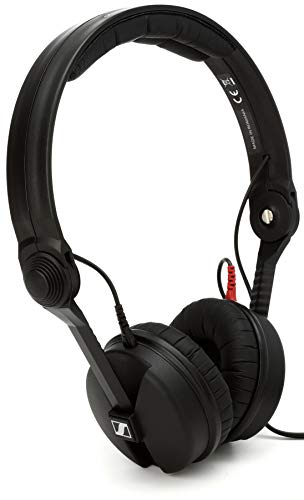
The HD 25 has been the default choice of touring DJs for 40 years, and the reason is simple: they isolate better than anything else at the price, they're effectively indestructible, and every component is replaceable. Ear cushions are $15. Cable is $20. This is the headphone you buy once and keep for a decade. Worth the upgrade once you're playing out regularly.
What we like
Industry-standard DJ headphone used by touring professionals for decades
Exceptional isolation cuts crowd noise in loud club environments
Every component replaceable, ear pads, cable, headband sold separately
What to know
Tight clamp pressure causes ear fatigue after 2+ hours of wear
Compact on-ear design takes adjusting to after larger over-ear cans
Studio monitors are not required on day one. Many beginners mix exclusively on headphones for months, especially in apartments. But at some point you need to hear what your mix sounds like on speakers. The key word is 'flat': you want monitors with no built-in bass boost or EQ curve. Standard monitors reveal low-end buildup and stereo balance issues that headphones routinely hide. Anything branded as 'multimedia,' 'Bluetooth,' or 'Hi-Fi' is almost certainly colored, not flat.
Best starter
PreSonus
Eris E3.5 BT Studio Monitors (Pair)
$$
★★★★★Our rating
The most affordable path to honest, flat speaker monitoring. The Eris E3.5 reveals bass buildup and stereo imbalance that headphones routinely hide. You don't need expensive monitors to practice, you need flat ones. PreSonus delivers that under $100 for a pair, with three input options (3.5mm, RCA, TRS balanced) covering every connection scenario.
What we like
Flat frequency response exposes mix problems headphones hide
Under $100 for a stereo pair, most affordable honest monitoring
3.5mm, RCA, and TRS balanced inputs cover every connection
What to know
Small woofers can't reproduce sub-bass below ~80Hz accurately
Sound stage narrows significantly outside the sweet spot
★★★★☆Our rating· Only 1 left in stock - order soon.
A solid budget alternative with one bonus feature: Bluetooth input lets you preview playlists from your phone without rewiring. The CR3-XBT sound is slightly colored rather than flat, which isn't ideal for reference mixing, but for a bedroom DJ doing practice runs, the accuracy tradeoff is acceptable at the price.
What we like
Bluetooth input lets you preview playlists from your phone
Under $80 for a stereo pair with decent bass extension
What to know
Bluetooth adds 50ms+ latency, never use it for actual monitoring
Slightly colored midrange, not as flat as Eris for critical work
When you're ready to hear your mixes as they truly are, the HS5 is the industry reference for home studios and DJ production setups. The 'near-white' woofer is deliberately uncolored, problems in your mix become impossible to ignore. Built-in room correction switches handle most apartment acoustic issues without treatment. Sold individually; plan to buy a pair ($400+ total).
A controller connects to your monitors via RCA cables. Check your controller's output, because the cables usually aren't included. Beyond cables, the other thing worth spending money on is a proper laptop stand. DJing from a flat desk surface strains your neck and puts your laptop below eye level, where equipment blocks the screen. A stand tilted at the right angle makes a three-hour session far more comfortable. Everything else (flight cases, cable sleeves, custom covers) can wait.
Best starter
Hosa
CRA-202 Dual RCA to Dual RCA Interconnect Cable
$9.95 as of Jun 22, 2026
★★★★★Our rating· In Stock
Most DJ controllers output via RCA, and most monitors accept RCA or TRS, so you'll need cables either way. The Hosa CPR-202 is the go-to: gold-plated connectors, decent shielding, and 2-meter length that works for virtually every bedroom DJ desk setup without excess slack. One of the most boring but genuinely necessary purchases on this list.
What we like
Gold-plated RCA connectors resist signal degradation over time
2-meter length works for most bedroom DJ setups without excess slack
What to know
Basic construction, no cable management or strain relief on plugs
Three hours of DJing with your laptop on a flat desk strains your neck and looks chaotic. The Crane Stand holds your laptop at eye level, tilted to the ideal angle for reading Rekordbox waveforms, and routes cables through the neck to keep your desk clean. Worth every dollar once you realize you're spending real time behind the decks.
What we like
Height adjustable with cable management built into the neck
Solid steel construction, won't wobble mid-set like cheap stands
What to know
Heavy for a laptop stand, not for DJs who move setups frequently
More expensive than generic stands, you're paying for DJ-specific design
DJing looks intimidating from the outside — two decks, a mixer, and someone who seems to know what they're doing at all times. It isn't. Here's what the first 20 hours actually look like.
DJing has a reputation for being technically complex. It isn’t — not at the beginner level. The basics are learnable in a weekend, the fundamentals lock in within a few weeks, and the skills that take years are the ones that make DJs great, not the ones that make DJs functional.
The first 20 hours are about getting functional. Then you can start getting good.
Hours 1–4: Set up, orient, make noise
The very first thing to do when your controller arrives is plug it in, open Rekordbox, and make some sound. Not mix. Not beatmatch. Just play tracks and move knobs until you understand which knob does what.
Here’s what the controls do, in plain language:
Jog wheels: Large platters that control the playback of your tracks. Spinning the top speeds up or slows down; gripping the edge gives finer control. They feel much more natural than they look.
EQ knobs (High, Mid, Low): Cut or boost the treble, midrange, and bass of each channel independently. The Low knob is what you’ll use most — swapping the bass between two tracks is the foundation of almost every house, techno, and hip-hop transition.
Gain/Trim: The overall volume of the channel before the fader. Get the green LED meter bouncing in the green zone; red means distortion.
Crossfader: Blends between the left and right channels. Most DJs barely use it (they prefer channel faders), but scratchers use it constantly.
Cue/Play buttons: The orange CUE button sets your start point and holds it. Press PLAY to start the track rolling.
Don’t try to memorize this. Import a few songs into Rekordbox, drop one onto each deck, and just start moving things. Twenty minutes of messing around teaches you more than an hour of reading.
Beatmatching is the act of making two tracks play at exactly the same tempo so they can be mixed together without the rhythm stumbling. It’s the skill most beginners think will be hardest. It isn’t.
Rekordbox shows you the BPM of every track. If Track A is 128 BPM and Track B is 130 BPM, you need to slow Track B down slightly (or speed Track A up). You do this with the pitch slider — a long vertical slider on each deck that adjusts playback speed.
The actual process:
Let Track A play through your speakers or monitors.
Cue Track B in your headphones: Put one ear of your headphones on, with the other ear listening to Track A through the room. Find the downbeat of Track B and press CUE to loop it there.
Press Play on Track B and listen for whether the beats are lining up or drifting.
Nudge the jog wheel to push Track B forward or back until the kicks land together.
Adjust the pitch slider if the tempo feels like it’s drifting (one track slowly catching up to or falling behind the other).
When they’re locked, bring Track B up in the mix with the channel fader.
This takes a while to feel natural. Expect the first few beatmatches to fall apart after 30 seconds. That’s normal. Expect to have it reasonably reliable by hour 10. That’s also normal.
One shortcut: sync buttons exist on most controllers and will auto-match BPMs. Use them to check your work, not to skip the process. Sync removes the feedback loop that trains your ear, and your ear is what will save you when sync fails at a gig.
Once you can beatmatch reliably, the next layer is when you mix — not just how. Most popular music is built in 8-bar phrases: an intro, a verse, a chorus, a drop. These phrases have beginnings and endings, and mixing across a phrase boundary sounds intentional; mixing in the middle of a phrase sounds like a mistake.
Rekordbox’s waveform display shows you where the energy changes in a track — where the drop kicks in, where the breakdown happens. The visual makes phrase awareness much more learnable than trying to hear it on the fly at first.
A good beginner’s transition template:
Bring in the new track at the start of a phrase in the outgoing track (usually every 8 or 16 bars)
Low-cut the incoming track: turn the Low EQ knob fully left to cut the bass from the new track while it enters
Let it play for 8–16 bars at low volume under the outgoing track
Swap the bass: turn the Low EQ on the incoming track back up, and cut the Low EQ on the outgoing track
Bring down the outgoing track and let the new track take over
This EQ swap is what most DJ transitions actually are, at any level. Fancy filter sweeps and effects are embellishments on top of this basic move.
Hours 15–20: Building a set
By hour 15 you can string together three or four mixes without a trainwreck. The next skill is thinking about the arc of a set — the energy level from start to finish.
A few things that help:
Key awareness: Rekordbox shows the musical key of every track (C major, A minor, etc.). Tracks in compatible keys sound good mixed together; clashing keys sound harsh. The “camelot wheel” is the standard reference for which keys are compatible — look it up once and you’ll use it constantly.
BPM range: Most DJs stay within a narrow BPM range for a set (say, 125–128 for house, or 95–100 for hip-hop). Jumping from 120 to 140 BPM mid-set is jarring unless you know what you’re doing.
Energy management: A good set builds energy gradually, peaks somewhere in the middle or toward the end, and has moments of release. Think of it like a good film rather than a constant crescendo. Opening at full intensity burns out your audience early.
By hour 20, you should have one set you could play at a friend’s house party — 45–60 minutes, reasonably clean, with a beginning, middle, and end. That’s not a professional set. It’s a real one.
What you’ll fail at — and what’s normal
A few things that trip up every beginner:
Train wrecks (two tracks that fall out of sync mid-mix): they happen to everyone. The fix is to cut to one track quickly and restart the mix. Nobody judges a clean recovery.
Volume mismatches: one track coming in way louder or softer than the last. Fix with the Gain knob before the mix, not the fader during it.
Mixing too early or too late: trying to mix in during a vocal line instead of an instrumental break. Listen for the instrumental sections; that’s your window.
Dead air from pausing: accidentally hitting Stop instead of Cue. Keep one track always rolling. Never let silence land.
The consistent thread across all of these: they go away with reps. An hour of deliberate practice (not passively listening to yourself play) fixes most beginner issues faster than reading any guide.
What comes after hour 20
Record your sets and listen back. You’ll catch timing errors and volume issues you didn’t notice in the moment. Painful, essential.
Find a regular listening habit. The DJs you admire have thousands of hours of music in their ears. Dig into charts on Beatport, explore DJ mixes on SoundCloud, and build a mental library.
Take your set public — even just a friends’ gathering. Playing with people in the room changes the psychology completely, and you’ll learn things about your instincts that solo practice can’t reveal.
Save your money
What you don't need yet
Beginners get pressured to buy a lot of stuff that doesn't help them play
better. Here's what we'd skip on day one.
A separate DJ mixer — Modern controllers have mixers built in. A standalone mixer is only for CDJ or vinyl setups you won't need for years.
CDJ players — CDJ-2000s cost $2,000+ each. Learn on a controller first, the fundamentals transfer fully when you're ready.
Serato DJ Pro subscription ($119/year) — Rekordbox comes free with your Pioneer controller and covers everything you need as a beginner. Upgrade only if you switch to a non-Pioneer ecosystem.
A PA or sound system — Headphones and a pair of nearfield monitors are plenty for home practice. PA speakers are for events, not your bedroom.
Timecode vinyl and a DVS setup — Vinyl DJ rigs cost $1,000+ and require a real mixer too. Romantic idea, but not how you learn to mix.
First week
Your first seven days
A short, real plan to get from gear-on-doorstep to actually playing.
Order the Pioneer DDJ-FLX4 so it arrives before the weekend. · Buy
Import your existing music library into Rekordbox. Let it analyze BPMs on everything, that grid takes a few hours but you'll use it constantly. · Action
Watch a beatmatching fundamentals video before you plug anything in. Knowing what you're trying to accomplish makes the first session click faster. · Learn
Pick two songs in the same BPM range and make your first mix, even if it's just nudging the jog wheel until the beats line up. You'll get it. · Action
Join r/DJs and read the wiki before posting, it answers every beginner question you're about to have. · Action
r/DJs wiki · Reddit · most-asked beginner questions answered
FAQ
Common questions
Do I need to know music theory to DJ?
No. Most DJs mix by key feel and BPM match. Software like Rekordbox shows you the key of every track, so harmonic mixing is a visual exercise, not a theory one. Basic music knowledge helps you understand phrasing (where verses and choruses start and end), but you can pick that up by ear after a few sessions.
Controller or turntables: what should I start with?
Controller, without question. A DJ controller with bundled software gives you everything you need to learn mixing fundamentals at a fraction of the cost. Turntables are for DJs who specifically want the tactile experience of vinyl or who are learning scratch techniques. You can always buy turntables later; you can't un-spend $1,500 on a vinyl rig you're not ready for.
Rekordbox or Serato: which is better for beginners?
Rekordbox, if you're on Pioneer gear (which you should be). It comes bundled free with every Pioneer DDJ controller and has the largest tutorial community online. Serato is excellent but requires a paid subscription beyond Serato DJ Lite. The technical differences don't matter for beginners, use whatever your hardware supports for free.
Can I mix with just headphones, or do I need studio monitors?
You can absolutely start with headphones only. Most beginners do. Studio monitors let you hear your mix as the room will hear it, especially useful for catching bass buildup, but they're not day-one essential. If you're in an apartment, headphone-only practice is perfectly reasonable for the first few months.
Can I use Spotify to DJ?
No. Spotify removed DJ integrations from Rekordbox and Serato in 2020. You need to own the tracks you mix. Beatport (buy individual tracks) and Tidal (streaming, integrates with some DJ software) are the main legal options. Most beginners start with tracks they already own in their iTunes or local library.
How long until I can DJ at a party?
Realistically, 2–3 months of consistent practice (a few hours a week) before you can reliably mix through a two-hour set without obvious train wrecks. Most people can pull off a friends' party after about 20–30 hours of practice, expectations are low, and the vibe matters more than technical perfection.
Digital DJ Tips — The most practical beginner DJ resource online. Phil Morse's articles and YouTube channel are the first stop for anyone learning. Start with the beginner course.
DJ TechTools — Gear reviews and advanced technique. More technical than Digital DJ Tips, read it once you've got the basics down.
r/DJs — Active subreddit with weekly gear and technique threads. Read the wiki first, it answers every beginner question and saves you from posting something already covered.
Point Blank Music School (YouTube) — Free DJ tutorial channel with structured content from intro through advanced. Better production quality than most free resources.
Pioneer DJ (YouTube) — Official Rekordbox tutorials from Pioneer. Watch when you hit a specific software question, the channel covers every feature in depth.
Beatport — The professional music store for DJs. Every genre has a chart you can preview in-browser. Start here when you're ready to build a proper crate.
As an Amazon Associate, JustBeginning earns from qualifying purchases.
We may also earn commission from other affiliate programs linked on this
page. Editorial recommendations are independent; we don't choose
products based on commission rates.
Product prices and availability are accurate as of the date and time
indicated and are subject to change. Any price and availability
information shown on Amazon at the time of purchase will apply.


 Best starter